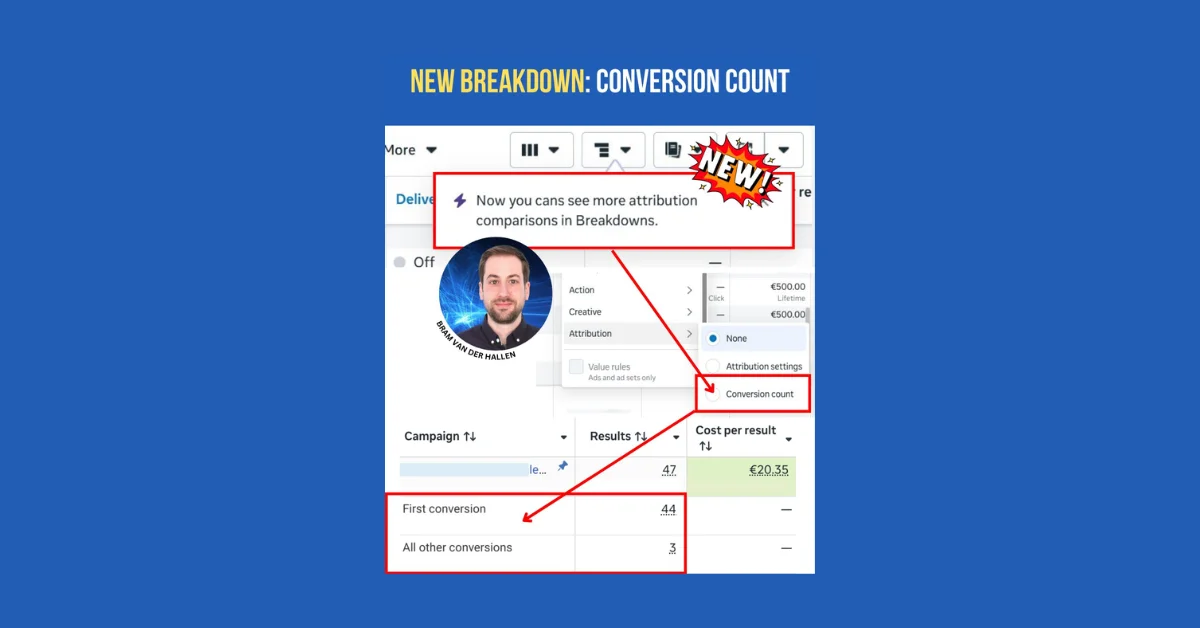
The new Meta Ads feature, 'Conversion count' under the 'Attribution' breakdown, enables advertisers to quickly analyze conversion data by separating 'First conversion' and 'All other conversions' that occur after a user clicks or views an ad. This is particularly valuable for conversion-focused campaigns like ecommerce, leads, and subscriptions, where users may convert multiple times within the attribution window.
How It Works
Selecting this breakdown adds two rows at the campaign, ad set, and ad level:
- First row: Total of first conversions.
- Second row: All other conversions, which include repeat purchases, additional form submissions, or other conversions by the same user within the attribution window.
Key Details
- The breakdown reflects data based on the attribution setting chosen during ad set creation (e.g., 7-day click, 1-day view) and does not compare different attribution settings.
- This differs from the existing option to compare attribution settings, which shows results across multiple attribution windows in columns.
- The new breakdown reports conversions within a single attribution setting, making it easier to analyze performance without cross-attribution comparison.
Background and Benefits
Previously, when optimizing for 'First conversions', Meta reported all conversions by default, causing confusion. This update clarifies results by distinctly showing first and subsequent conversions within the same attribution setting. It streamlines performance analysis, helping advertisers verify if Meta is prioritizing new converters over repeat conversions when optimizing for 'First conversions'.
Usage Notes
- The new breakdown cannot be combined with columns reporting different attribution settings since they represent different reporting methods.
- The 'Breakdown' feature splits results into rows within one attribution setting.
- The 'Compare attribution settings' feature splits results into columns across multiple attribution windows.
This option is found at the bottom of the 'Breakdown' dropdown menu in Ads Manager, listed below 'Creative'.