Looker Studio News

Browse Looker Studio updates sorted by latest

Looker Studio Adds Cross Data Source Filtering and Chart Visibility Controls

Looker Studio Adds Cross Data Source Filtering and Chart Visibility Controls

18 days ago

Looker Studio updates include cross data source filtering, allowing controls to filter charts from different data sources by overriding default field IDs. Users can now show or hide individual charts and components for all or select viewers. A new histogram chart feature helps visualize data distribution, revealing insights about data shape, center, and spread not easily seen in pie or bar charts.
Google Cloud
Google Cloud

Official Source

Official Source

Google Cloud is a Official Source. The source has been verified by Swipe Insight team.

Official Source
Looker Studio Pro adds hourly report delivery and alert scheduling feature

Looker Studio Pro adds hourly report delivery and alert scheduling feature

2 months ago

Looker Studio Pro users can schedule hourly report deliveries and alerts by sending PDFs of reports with links to stakeholders. Scheduling requires permissions or ownership. To set up, view the report, select Share, then Schedule delivery, enter recipients, choose pages, set start time, and frequency, including custom options. Click Schedule to activate.

Google Cloud
Google Cloud

Official Source

Official Source

Google Cloud is a Official Source. The source has been verified by Swipe Insight team.

Official Source
Looker Studio updates Explorer beta removed Treemap improved and Pro schedules increased

Looker Studio updates Explorer beta removed Treemap improved and Pro schedules increased

4 months ago

The Looker Studio Explorer (beta) feature is deprecated and will be removed, with existing explorations auto-converted to reports. Enabling Viewer's Credentials disables hyperlinks and images in data sources unless viewer and creator share a team workspace. Treemap charts now have improved color options, border radius control, and a new label section. Pro users can schedule up to 200 reports.

Google Cloud
Google Cloud

Official Source

Official Source

Google Cloud is a Official Source. The source has been verified by Swipe Insight team.

Official Source
Meta Ads Audit Checklist

Meta Ads Audit Checklist

Featured

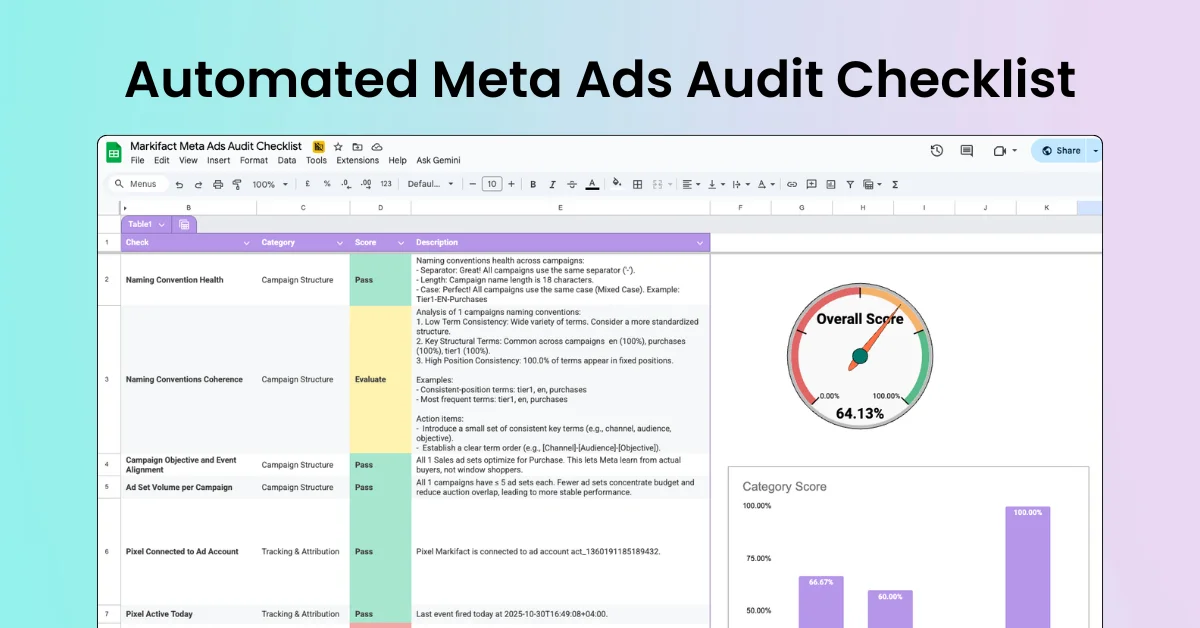
Run a Meta Ads audit with 100+ data points using a structured, automated checklist. Review campaigns, ad sets, ads, creatives, targeting, budgets, and delivery settings to spot hidden issues and missed optimizations. Built for agencies and teams managing multiple accounts who want consistent audits, faster reviews, and clear, actionable insights—without manual digging.

Markifact
Markifact

Verified Sponsor

Verified Sponsor

Markifact is a Verified Sponsor. Want to get featured here? Contact us.

Verified Sponsor
Google unveils Conversational Analytics API to chat with data anywhere

Google unveils Conversational Analytics API to chat with data anywhere

5 months ago

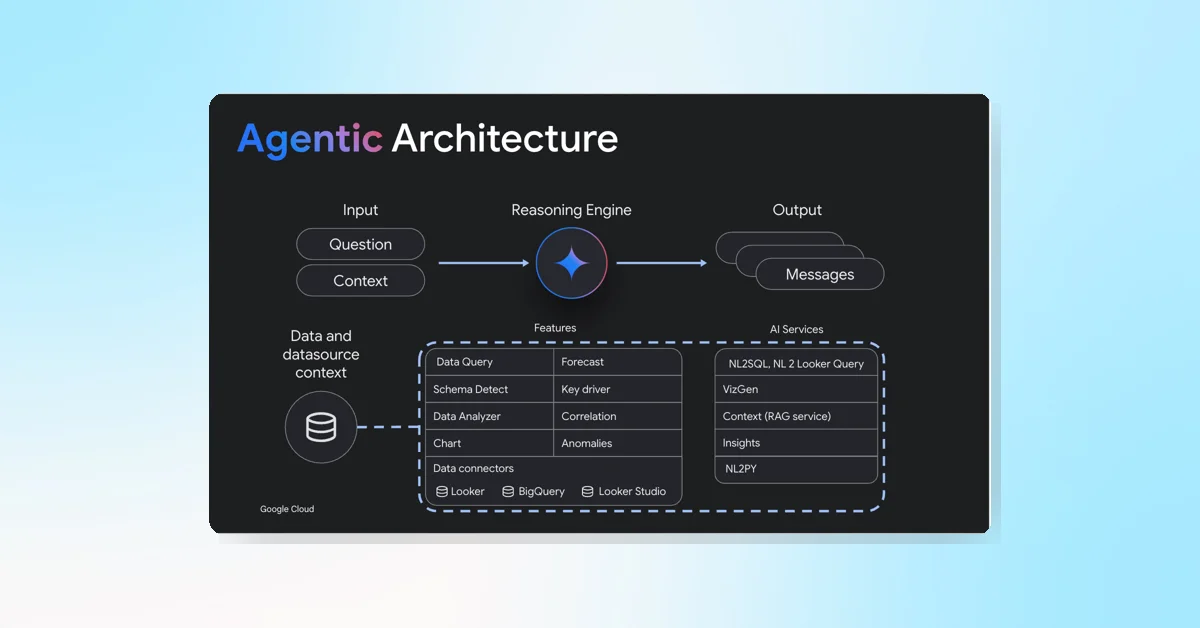
Google Cloud's Conversational Analytics API, in public preview, lets developers embed natural language queries into apps using trusted data from Looker and BigQuery. It combines AI with Looker's semantic model for accurate, context-aware insights accessible anywhere. Features include text-to-SQL, code interpretation, charting, AI-assisted context, multi-agent support, role-based access, and query controls for seamless, secure data interaction.

Google Cloud
Google Cloud

Official Source

Official Source

Google Cloud is a Official Source. The source has been verified by Swipe Insight team.

Official Source
Looker Studio Adds Background Colors for Bar and Column Chart Labels

Looker Studio Adds Background Colors for Bar and Column Chart Labels

5 months ago

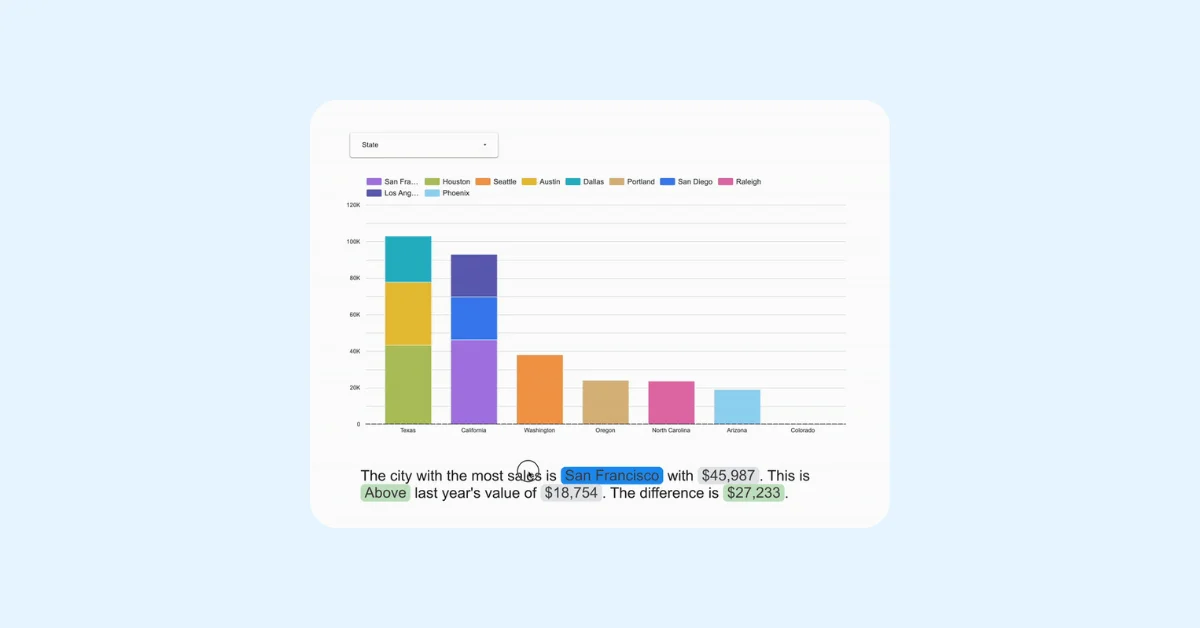
Looker Studio now allows setting background colors for data labels on bar and column charts. Data label options include showing metric values, stacked totals, or percentages, with settings for compact numbers and decimal precision. Users can customize font family, size, color, and styling. Label position, background color, opacity, and border radius can also be adjusted for better presentation.

Google Cloud
Google Cloud

Official Source

Official Source

Google Cloud is a Official Source. The source has been verified by Swipe Insight team.

Official Source
Looker Studio Adds Conditional Formatting to Query Result Variables Trending ️‍🔥

Looker Studio Adds Conditional Formatting to Query Result Variables

6 months ago

Google added conditional formatting to Looker Studio Query Result Variables, enabling dynamic text to change colors based on data thresholds like scorecards. Users can apply single color or color scale formatting by setting rules and colors. Multiple rules can be created, edited, deleted, or reordered, with higher-priority rules overriding lower ones, improving data visualization and interpretation in reports.

Looker Studio Pro adds Code Interpreter for advanced data analysis in preview

Looker Studio Pro adds Code Interpreter for advanced data analysis in preview

6 months ago

The Code Interpreter is now available in Preview for Looker Studio Pro. It translates natural language questions into Python code to perform advanced analysis and visualizations. Disabled by default, it supports a wide range of analytics, from basic computations to time series forecasting, enhancing Conversational Analytics without needing advanced coding skills. Available in Looker Studio Pro, Looker original, and Google Cloud core.

Google Cloud
Google Cloud

Official Source

Official Source

Google Cloud is a Official Source. The source has been verified by Swipe Insight team.

Official Source
Looker Studio Adds Report Abuse Feature and Boosts BigQuery Performance

Looker Studio Adds Report Abuse Feature and Boosts BigQuery Performance

6 months ago

Google's Looker Studio added a report abuse feature letting viewers flag inappropriate content, which is then reviewed and removed or hidden. Performance improvements were made for BigQuery data sources, including a short query optimized mode that speeds up queries under certain credential conditions, enhancing response times without changing workflows for data source owners.

Google Cloud
Google Cloud

Official Source

Official Source

Google Cloud is a Official Source. The source has been verified by Swipe Insight team.

Official Source
Looker Studio enables Code Interpreter by default for Pro users

Looker Studio enables Code Interpreter by default for Pro users

8 months ago

Looker Studio enables Code Interpreter by default for Pro users when Gemini in Looker and Trusted Tester settings are active in the Google Cloud project. It converts natural language questions into Python code for advanced analysis and visualizations. Admins can control the feature via User Settings. Requirements include a Pro subscription, Google Cloud project, and enabled settings, enhancing AI-powered analytics in Looker Studio.

Google Cloud
Google Cloud

Official Source

Official Source

Google Cloud is a Official Source. The source has been verified by Swipe Insight team.

Official Source

FAQs