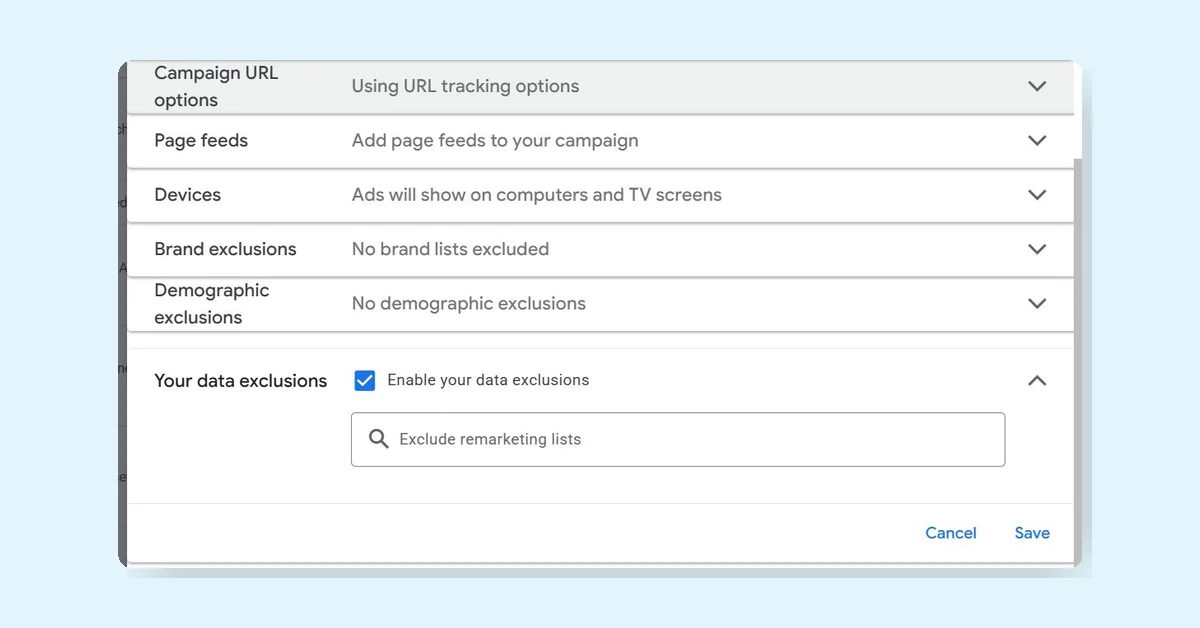
PMax has introduced a significant update called "Your Data Exclusions," enhancing campaign control by allowing exclusion of first-party data directly at the campaign level. This new feature is distinct from the existing "Data Exclusions" related to conversion outages.
Key Features of Your Data Exclusion Settings
- Enables exclusion of Remarketing Lists and Customer Match Lists.
- Allows exclusion of any Website Visitor Lists or Customer Match Lists from PMax campaigns.
- This exclusion applies broadly to all remarketing lists, not just as an audience signal.
How to Use the Feature
- Navigate to Campaign Settings.
- Find Your Data Exclusions under demographic exclusions.
- Enable the setting and select the lists you want to exclude.
This update gives advertisers more precise control over which first-party data is used in PMax campaigns.