Starting June 15, 2026, Google Ads API will no longer accept new adopters for offline conversion imports, including enhanced lead conversions. The Data Manager API will be the primary method for offline conversion imports. Developers not using offline conversions by May 2026 will get errors if they try to import. Current users can continue with Google Ads API while migrating to Data Manager API. Developer tokens will be allowlisted, and support is available.
The Google Ads API v24.1 release requires upgrading client libraries and code. New features include mobile device platform segmentation for better traffic analysis, support for classic images in DemandGen campaigns, passkey authorization for sensitive actions, and enhanced experiment types for detailed performance comparison. A new data retention policy starts June 2026, limiting granular data to 37 months. Resources and support are available.
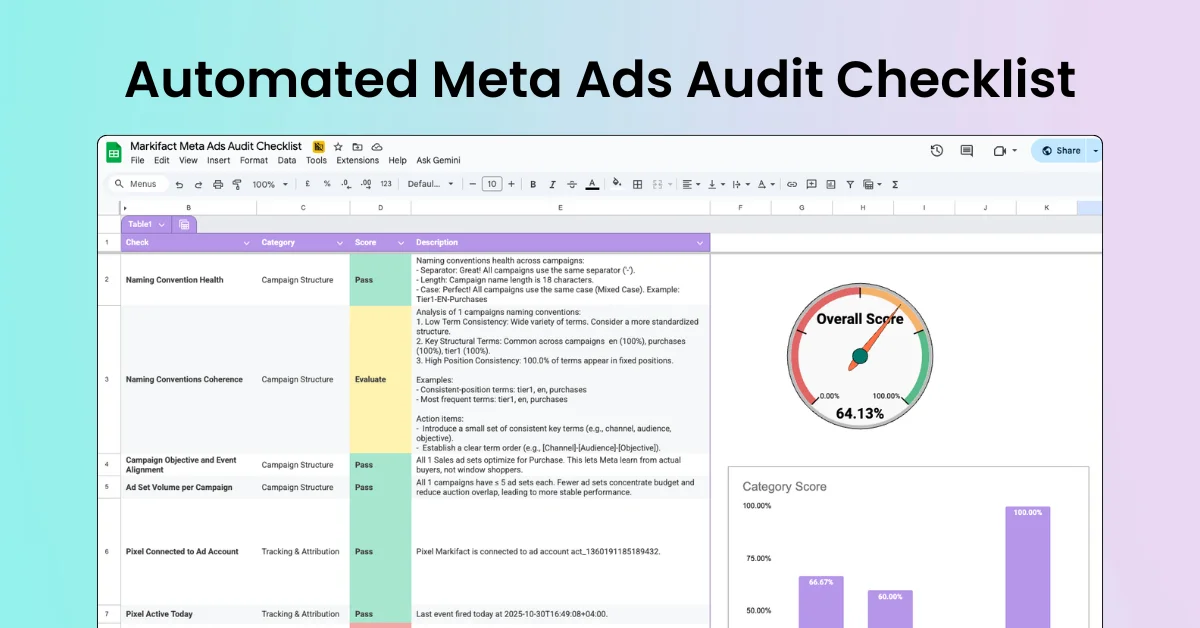
Run a Meta Ads audit with 100+ data points using a structured, automated checklist. Review campaigns, ad sets, ads, creatives, targeting, budgets, and delivery settings to spot hidden issues and missed optimizations. Built for agencies and teams managing multiple accounts who want consistent audits, faster reviews, and clear, actionable insights—without manual digging.
The Data Manager API now supports uploading store sales conversions to Google Ads with a simpler workflow, confidential matching, and encryption. It expands Google Analytics event ingestion for web and app streams, allowing any event except reserved ones. The API supports metadata like app instance ID and event routing via Firebase App ID or Measurement ID. Some features require eligibility or allowlist access.
Starting June 1, 2026, Google Ads and related APIs will enforce a 37-month data retention policy for granular performance data. Queries for data older than 37 months with granular segments will return errors. High-level data remains available for 11 years. BigQuery transfers will stop backfilling data older than 37 months. Users should export data before the deadline and update queries accordingly.
Starting June 15, 2026, Google Ads API will expand product reporting to include all Performance Max networks. Metrics for shopping_product will cover Video, Demand Gen, and App campaigns, not just Shopping and Performance Max. All campaigns using Google Merchant Center will report via shopping_performance_view. Performance Max campaigns will show all networks, causing a one-time increase in metrics. Historical data before this date won't include these changes.
Google Ads API v24 is released, requiring client library upgrades to access new features. Key updates include support for conversions with cart data, enabling detailed sales insights, and new metrics for product sales. Several services like AudienceInsights, ReachPlan, and ContentCreatorInsights have been refactored. Changes affect campaign budget, asset views, video ads, and preview services. Live walkthroughs and resources are available for developers.
Starting April 21, 2026, Google Ads API requires multi-factor authentication (MFA) for users generating new OAuth 2.0 refresh tokens via user authentication workflow. Service account workflows are unaffected. Platforms like Google Ads Editor and BigQuery Data Transfer Service will also require MFA. Users can enable MFA in Google Account security settings; some accounts may have this disabled by administrators.
The April 2026 update to the Display & Video 360 API adds support for more Exchange and ThirdPartyVendor values, AdAsset identifier fields in AdGroupAd resources, and beta support for Demand Gen resource management, available only to allowlisted customers. Demand Gen features include managing line items, ad groups, ads, and targeting. Full Demand Gen support will launch later this year. Update your client library before use.
Google launched the Advertising and Measurement Developers Hub to help developers automate campaigns, analyze performance, manage tags, and monetize apps. The site includes a homepage, Developer Relations team info, a product directory for Google Ads API, Analytics APIs, and Publisher Tools, plus connections via Discord, support, and GitHub. It also features multimedia content like Ads DevCast and encourages user feedback.