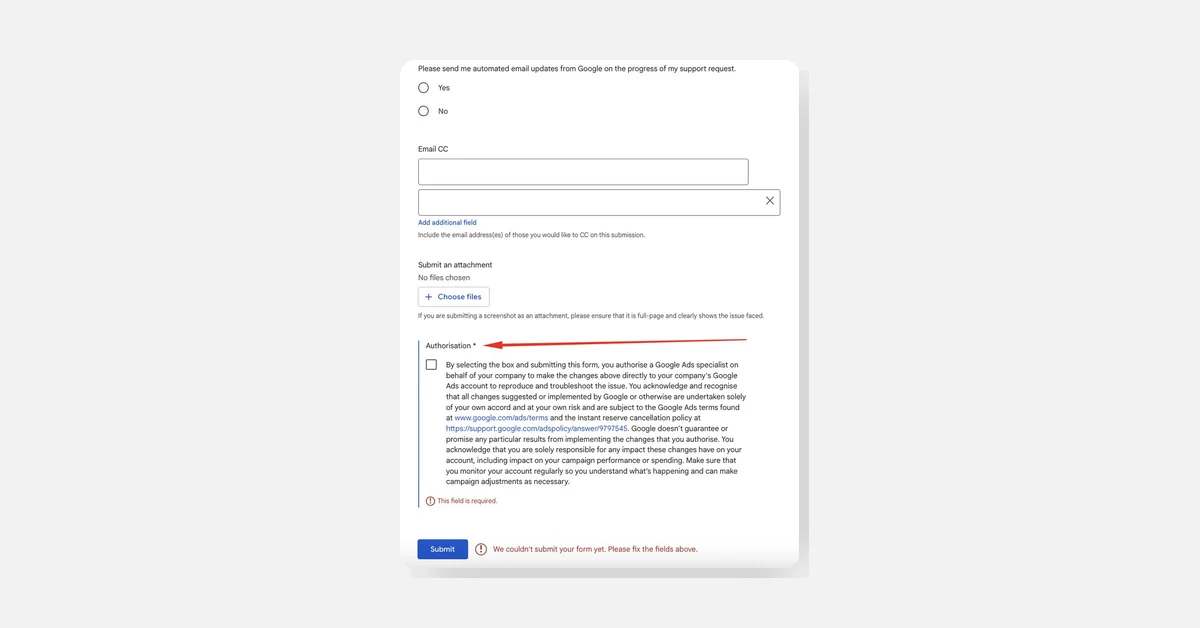
Google Ads support now requires users to provide authorization before submitting a support form for account changes. When contacting support, users first interact with a beta AI chat and then choose between Call, Chat, or Form options. Selecting the Form option mandates ticking an authorization box that allows a Google Ads specialist to access and make changes to the user’s account for troubleshooting purposes.
Key Details
- Authorization is mandatory to submit the form.
- By authorizing, users permit a Google Ads specialist to access and modify their account.
- Users bear the risk and responsibility for any changes, including spend and performance outcomes.
- Google offers no guarantees on performance after changes are made.
- Users should be fully aware of the implications before granting authorization.